Read the door
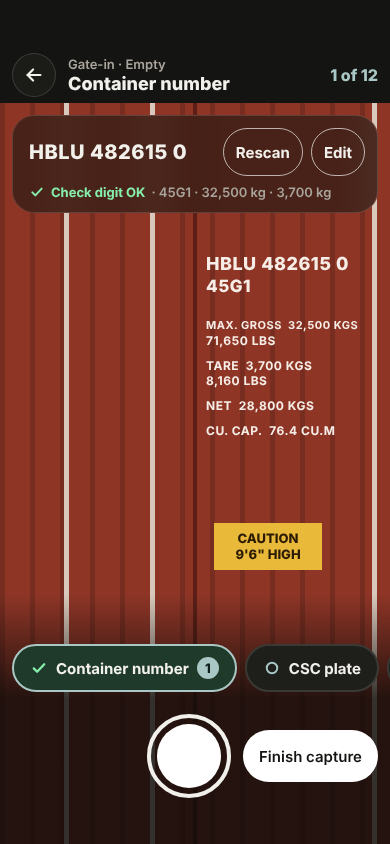
Point the camera at the door. Boxvera reads the number, the size and type code and the weights, and fills them in.
Container inspection app, made with for depots worldwide
When a line questions a repair, or a driver says the dent wasn't there, you open the EIR and show the photo. Boxvera reads the container number off the door, takes your surveyor round the box once, and issues the EIR from the phone, even with no signal at the gate.
A 30-minute demo, on a video call or at your gate. At your gate, we time one of your paper gate-ins, then run the next one on Boxvera.
40 to 50 percent of containers arrive with some damage. If a damage isn't on the gate-in EIR with a photo, the line can say it happened in your yard, and the repair cost lands on your depot.
Type your number to see how many damaged boxes cross your gate in a month.
Today: Paper slip retyped, 15 to 30 minutes a gate-in
The EIR goes from phone to gate screen
Today: Dent seen, never photographed, argued weeks later
Every damage on the EIR with a photo
Today: Damage photos lost in a surveyor's WhatsApp
Photos filed on that container's EIR
Today: One wrong digit, box filed under the wrong number
Check digit verified as the number is read
Today: Free-text notes your estimator codes by hand
CEDEX codes proposed for each damage
Today: Driver denies the damage, and never signed the EIR
Driver photo and an optional 6‑digit code
Every face, outside and inside, has its photo. Every damage has its location, a note and its own photo, with the time it was taken.
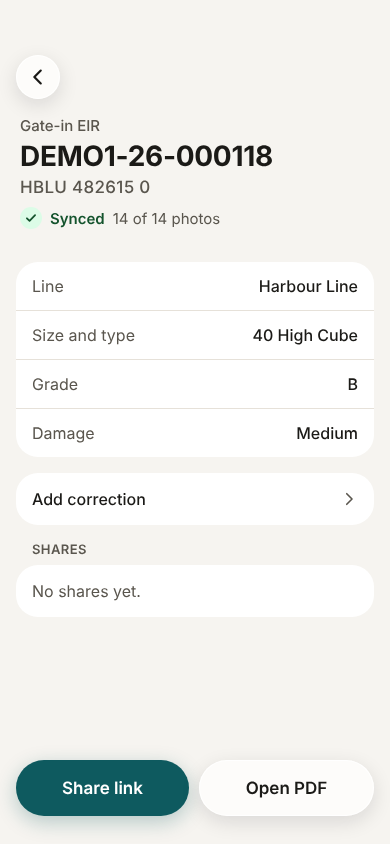
Send the line's equipment team a view-only link. They open it in a browser, with no account, and see the same EIR with its photos.
Book a demo on your yardThe reading runs on the phone itself, so it works at a gate with no signal. Your surveyor lets the live camera read the door, or takes one photo and lets Boxvera read that.
On the phone it's 2 screens: a camera walk, then one screen to confirm.
Point the camera at the door. Boxvera reads the number, the size and type code and the weights, and fills them in.
One button per photo: the CSC plate, each face outside and inside, the truck plate and the driver. Each damage gets a location, a short note and a photo.
Check what was read on one screen. Set the grade (A, B or C, with your depot's own labels) and the damage severity (No, Low, Medium or High).
The EIR issues from the phone, signal or not, and reaches the gate operator's screen as soon as it syncs. The PDF and a view-only link are ready for the line.
From the first photo to Issue EIR, the survey needs no network. Here's what happens to the record.
Each photo saves to the phone the moment it's taken, and the survey saves after every shot. Closing the app loses nothing.
Issued EIRs queue on the phone and the surveyor moves to the next truck. Nothing leaves the phone until the server confirms it has it.
Photos go up first, then the record. The EIR number, PDF and share link follow straight away. If one record gets stuck, the rest still go through.
Big buttons, one camera walk, and 2 colour modes: Sunlight for the gate at noon, Low light for the night shift.
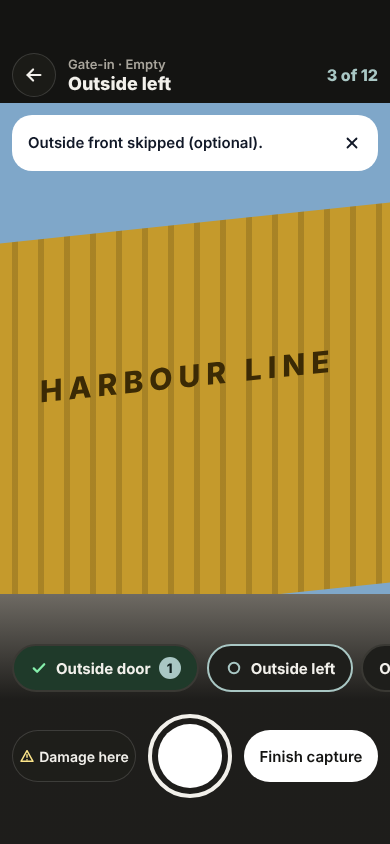
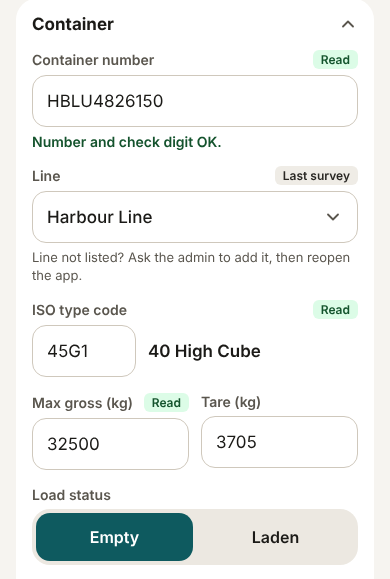
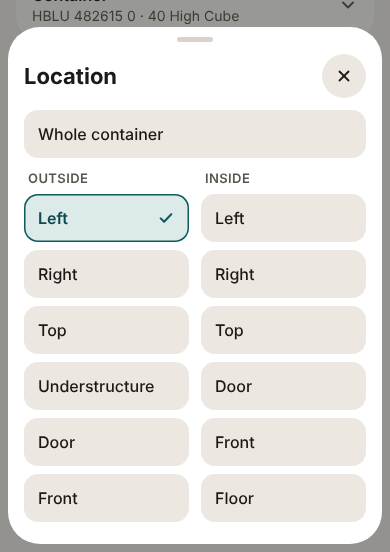
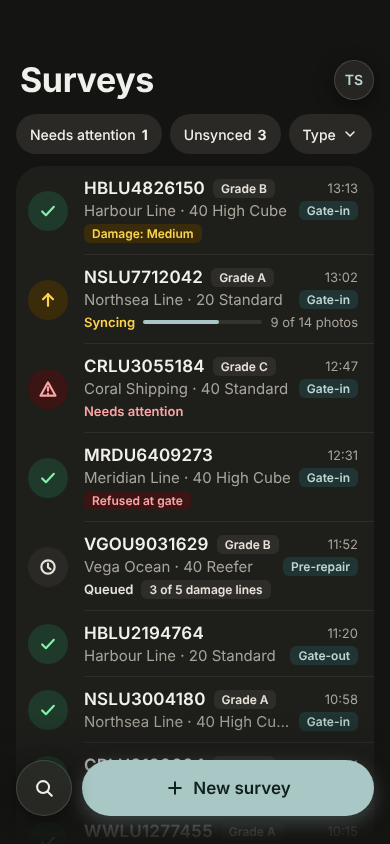
The camera walk, the grade and damage severity, the EIR. Gate-out adds the seal number, the release reference and the reefer fields.
Your estimator starts from proposed CEDEX codes for each damage and confirms or changes each one.
Records the repair result with photos. Export the damage lines and download the photos for the line's own system.
A WhatsApp photo isn't tied to a container number or a face of the box, and it leaves with the surveyor's phone. In Boxvera every photo sits on that container's EIR, and the line opens it from a link.
We quote after the demo, once we've seen your gate and how many surveyors you run.
We usually set up the system for you within a day of order confirmation, with your users, lines and grade labels in place.
WhatsApp and email support during depot hours.
No. We set Boxvera up on your cloud account or on a server at your depot, with your users, lines and grade labels. After that the office opens it in a browser and surveyors use the phone app.
On your own cloud or on a server at your premises. Each customer gets its own deployment of Boxvera with its own database, so no other company sees your data.
Boxvera handles the surveys and the EIR. Invoices, gate passes, LOLO charges and EDI to lines stay where they are today. Your gate operator works from the EIR on screen instead of a paper slip.
The surveyor types the number, and Boxvera warns on the spot if the check digit fails. A damaged or repainted door never stops the gate. The ISO code and weights can be typed too.
Yes. Export the damage lines and download the photos for each container, then upload them the way you do today. Nobody retypes from a paper slip.
The phone flow is 2 screens: a camera walk and a confirm screen. Your senior surveyor walks a real gate-in with us at the demo.
Android and iPhone. As part of setup, we check it on the phones your surveyors carry.
No. The surveyor photographs the driver with the truck documents. Want the driver's acknowledgment too? Turn on driver one-time codes: Boxvera texts a 6-digit code to the driver's phone, and the surveyor enters it to verify. It never holds up the EIR.
Yes. Turn on Hindi for your depot, and your surveyors' screens follow.
Yes. A reefer gets a reefer unit photo and a Unit running check at gate-in, and gate-out records the reefer fields.
Your surveyor finds the damage; that's the job they know. Boxvera records each one with its location, a note and a photo, then proposes CEDEX codes so your estimator starts from a draft.
Photos are compressed on the phone to under 500 KB each, so a full walk round the container stays light on a weak gate signal.
It comes from the Latin vera, meaning true. Boxvera keeps the true record of every box, from gate-in to gate-out.
Every gate-in on paper is another box whose damage has no photo on file. The demo takes 30 minutes, on a video call or at your gate. At your gate, we time one of your paper gate-ins first, then run the next one on Boxvera.
What happens after you book